
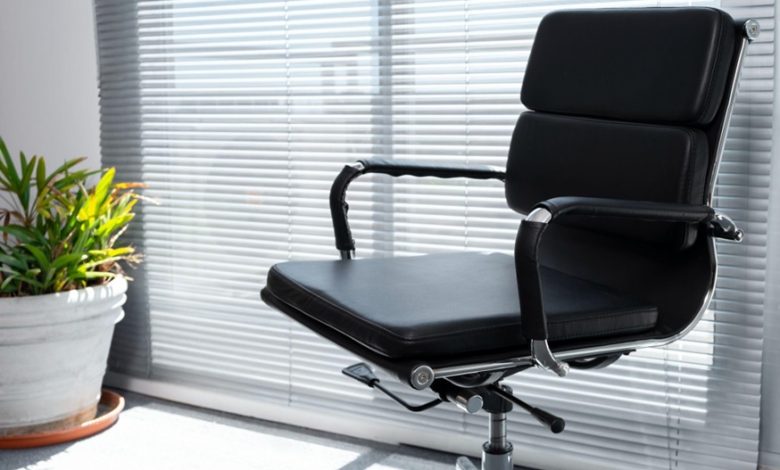
Most of us spend 8 to 10 hours a day anchored to our desks. By mid-afternoon, that familiar, irritating ache creeps into your lumbar spine, forcing you to shift, stretch, and sigh in frustration. Poor seating ruins your posture, drains your energy, and compromises long-term spinal health.
Finding the best ergonomic chair can revolutionize how you feel at the end of a long workday. However, not all office seating delivers genuine orthopedic relief. Modern workspaces increasingly incorporate modular system furniture to optimize productivity, yet workers still suffer when their personal seats lack targeted lumbar support. Before you invest your hard-earned money, here is your definitive checklist to ensure you pick a seat that truly saves your back.
- Adjustable Lumbar Depth and Height – Ensure the lumbar mechanism moves vertically and horizontally to fit the natural lordotic curve of your lower spine.
- Dynamic Recline Mechanism – Look for synchronous-tilt features that encourage active sitting and reduce spinal compression during long tasks.
- Seat Pan Slider – Check for customizable seat depth to prevent pressure on the back of your knees while supporting your thighs.
- 3D or 4D Armrests – Confirm the armrests adjust in height, angle, and width to take excessive strain off your neck and shoulders.
The Lumbar Sweet Spot: Height, Depth, and Adaptability
The human spine features a natural inward curve at the lower back. When you sit without proper backing, your pelvis tilts backward, flattening this curve into an unnatural slouch. This poor alignment places enormous pressure on your spinal discs.
A static cushion simply will not cut it. The best ergonomic chair features dynamic lumbar support that adjusts in both height and depth. You must position the support directly into the small of your back, roughly at belt level. Some premium chairs feature self-adjusting tension systems that flex with your movements throughout the day, while others let you dial in precise mechanical resistance. Test this feature thoroughly: if the lumbar support feels too aggressive or fails to reach your lower spine, keep looking.
Seat Pan Savvy: Depth and Waterfall Contours Matter
People frequently overlook the seat cushion when hunting for lower back relief, but the two are intimately connected. If your seat pan is too deep, you will naturally slide forward to bend your knees over the front edge. This movement detaches your back entirely from the backrest, destroying your posture.
Always look for a seat slider mechanism. You should maintain a gap of roughly two to three fingers between the front edge of the seat and the back of your knees. Furthermore, look for a “waterfall” front contour that slopes gently downward. This design prevents the chair from cutting off circulation to your lower legs, ensuring proper blood flow while you tackle intense deadlines.
Seamless Integration: Matching Your Seat with Your Desk
A fantastic chair cannot save your back if your desk forces you into awkward postures. Your chair must work harmoniously alongside your broader workstation.
Many contemporary corporate hubs and home offices rely on integrated system furniture designed with fixed heights, cable management channels, and modular partitioning. When shopping for a task chair, measure your desk clearance carefully. Ensure the chair’s cylinder lowers sufficiently so your feet rest flat on the floor, keeping your knees at a 90-degree angle. Simultaneously, the armrests must slide neatly under your desk surface, allowing you to pull yourself close to your monitor without hunching forward.
Material Magic: High-Tensile Mesh vs High-Density Foam
Your body produces heat during long working hours, and physical discomfort often stems from temperature buildup. Choosing the right upholstery determines whether your chair provides lasting support or sags after six months.
High-tensile, breathable elastomeric mesh contours directly to your back, distributing body weight evenly across the frame while keeping you cool. If you prefer traditional padding, insist on molded, high-density foam cushions rather than cheap cut foam. High-density foam retains its shape and elasticity over years of heavy daily use, ensuring your pelvis receives firm, stable foundation support that directly relieves lower spinal strain.
The Verdict: Invest in Lasting Spine Health
Selecting the right seating is an investment in your daily focus, physical vitality, and long-term well-being. By prioritizing customizable lumbar mechanisms, proper seat pan depth, and effortless workstation harmony, you transform your daily working experience. Ditch the temporary fixes, say goodbye to backaches, and upgrade to seating that works as hard as you do!
Frequently Asked Questions
How does proper lumbar support relieve lower back pain?
It maintains the natural inward curve of your lumbar spine, preventing muscle strain, disc compression, and slouching during prolonged sitting sessions.
Can I use an ergonomic chair with any style of office desk?
Yes, provided the chair offers adequate height adjustability and 3D armrests that clear the desktop, making it easy to pair with both standing desks and standard modular furniture setups.
How often should I adjust my ergonomic chair settings?
You should fine-tune your chair settings whenever you change your footwear, switch workstations, or transition between intense typing tasks and relaxed conference calls.
Contact Ergoworks today, and experience the ultimate in personalized spinal comfort!


